
Bid Solicitation Notice Subscription
Bid Solicitation Notice Subscription Request
To receive notification of advertised projects within FDOT, please go to the Report Subscription page.
Once there:
- Sign in to the Public section of the site. (Create an account if you do not have one already. If you have a CPP account, this will use the same login information.)
- Update any necessary contact information on the left-hand side.
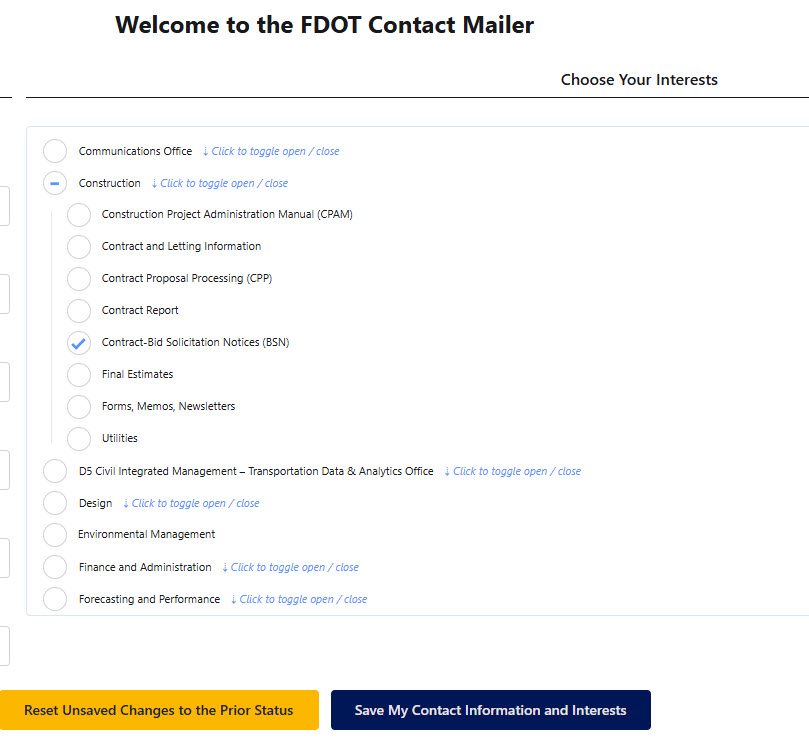
- On the right-hand side, under the "Choose Your Interests" section, select Contract-Bid Solicitation Notices (BSN) as shown below.
- Click the "Save My Contact Information and Interests" button.
You will receive a confirmation email with a link to activate your subscription. You may also unsubscribe from the Report Subscription page by unchecking any previously selected report and saving..